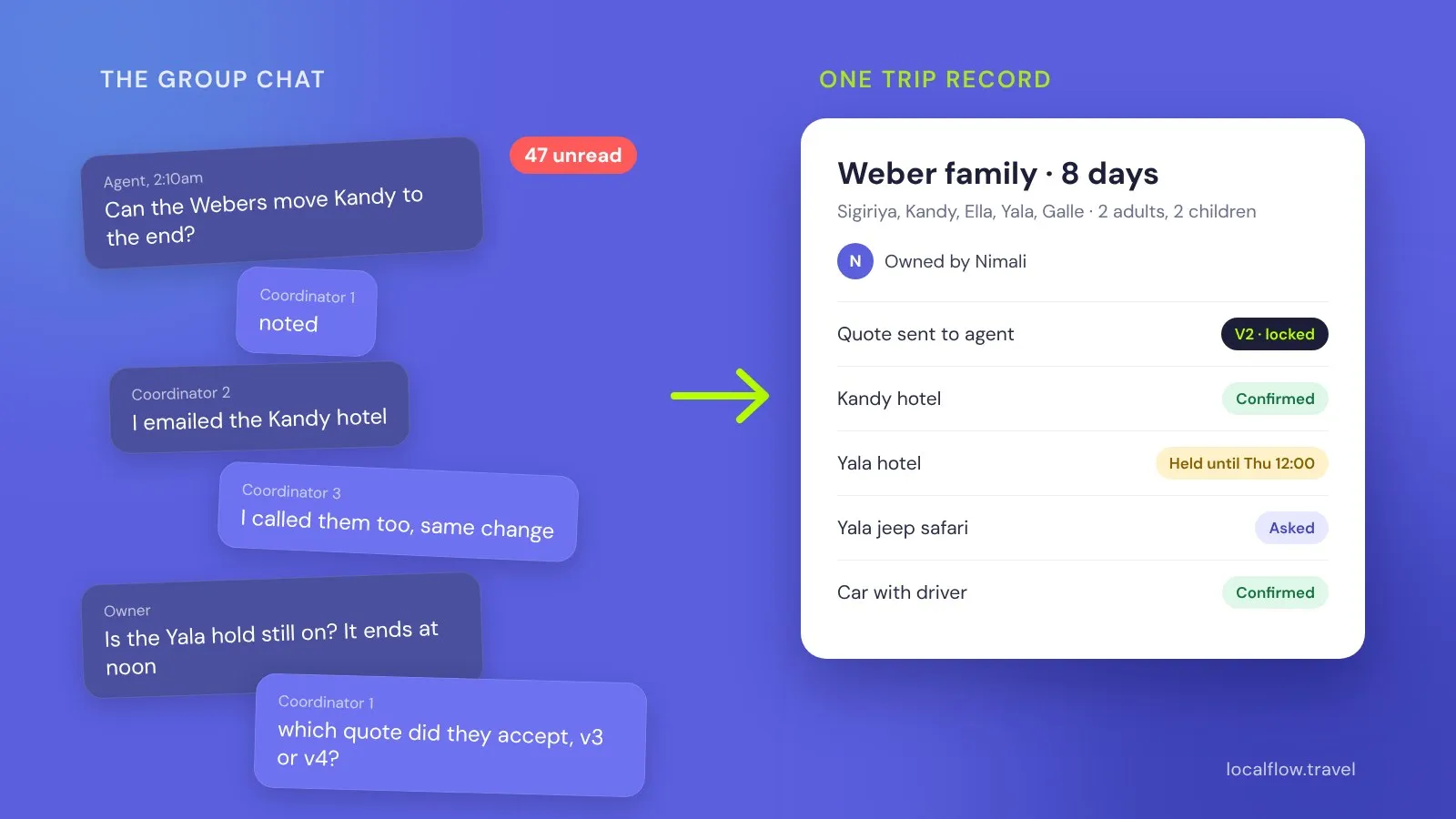
It’s 2:10am. A German agent sends a WhatsApp message asking if the Weber family can move their Kandy night to the end of the trip.
By 8am, three people have seen it. One coordinator replies “noted.” Another emails the Kandy hotel. A third, who didn’t see either reply, calls the same hotel and asks for the same change. Nobody updates the costing. Nobody checks whether the Yala hold that expires at noon is still needed.
Nobody did anything wrong. Everyone was trying to help. That’s the problem.
This is what tour operations management looks like in most growing DMCs. It isn’t a lack of effort. It’s a system built for three people being run by eight.
When your team grows past five, the group chat stops working. This article is about what breaks, what it quietly costs you, and how to pull your operation back into one place without stopping the business to do it.
Why it worked when you were three people
In the early years, you didn’t need a system. You were the system.
The owner took the enquiry, built the quote in a three-tab Excel file, called the hotels they’d known for fifteen years and sent the vouchers themselves. If something changed, it changed in one head. If a driver called from Ella with a flat tyre, there was exactly one person to call.
A WhatsApp group made sense then. Three people, ten active trips, everyone reading every message. Information didn’t need to be stored anywhere because everyone already knew it.
That setup isn’t a mistake. It’s the right tool for a small team. The trouble starts when the team grows and the tool doesn’t.
Five signs your operation has outgrown the group chat
Most operators don’t notice the moment it breaks. It happens slowly, one awkward week at a time. These are the signs we hear about most from DMC owners in Sri Lanka.
1. Nobody can say who owns a booking
Ask your team who is handling the Turner couple’s December trip. If you get two names, or a pause, the trip has no owner. It has a group of people who each assume someone else is on it.
2. A hotel hold expires and nobody notices
The hotel said they’d hold five rooms until Thursday noon. It was agreed on a call. Nobody wrote it down. On Friday morning the rooms are gone, and so is the Christmas availability at that property.
3. The customer has one version of the quote, and your team has another
The agent accepted version three. Your coordinator is booking from version four, which added a night in Galle the customer never saw. Now someone has to explain an invoice that doesn’t match what was sold.
4. A supplier gets asked twice, or never
Two coordinators email the same jeep operator in Yala for the same date. Or each one thinks the other has done it, and nobody asks at all. The supplier notices either way, and neither looks good.
5. Someone goes on leave and their trips stall
Your best coordinator takes a week off. Her trips live in her inbox, her WhatsApp and her memory. The person covering for her spends the first two days just working out what’s been promised.
If two or more of these sound familiar, the problem isn’t your people. It’s where the information lives.
What this actually costs you
Scattered information rarely shows up as one big loss. It shows up as small leaks that nobody adds together. So add them together.
Start with time. Ask each coordinator how long they spend in a normal day searching for information: scrolling chats, digging through email threads, asking a colleague “did the hotel confirm?” Be honest. Thirty minutes is common. An hour isn’t unusual in peak season.
Now run your own numbers:
| What to count | Example (replace with yours) |
|---|---|
| Minutes a day each coordinator spends searching | 45 |
| Number of coordinators | 6 |
| Working days a year | 290 |
| Hours lost a year | 1,305 |
That’s more than seven months of one full-time person, spent looking for things the business already knows.
Then add the losses that don’t show up on a timesheet. One expired room block in December. One quote sent with last season’s tariff. One supplier who stops giving you priority because you asked them the same thing three times. One agent who quietly sends their next group to another DMC.
None of these are dramatic on their own. Together, they’re often the difference between a good season and a tired one.
What centralizing really means
Centralizing your tour operations doesn’t mean buying software. It means agreeing where the truth lives. A tool can help with that later, but the decision comes first.
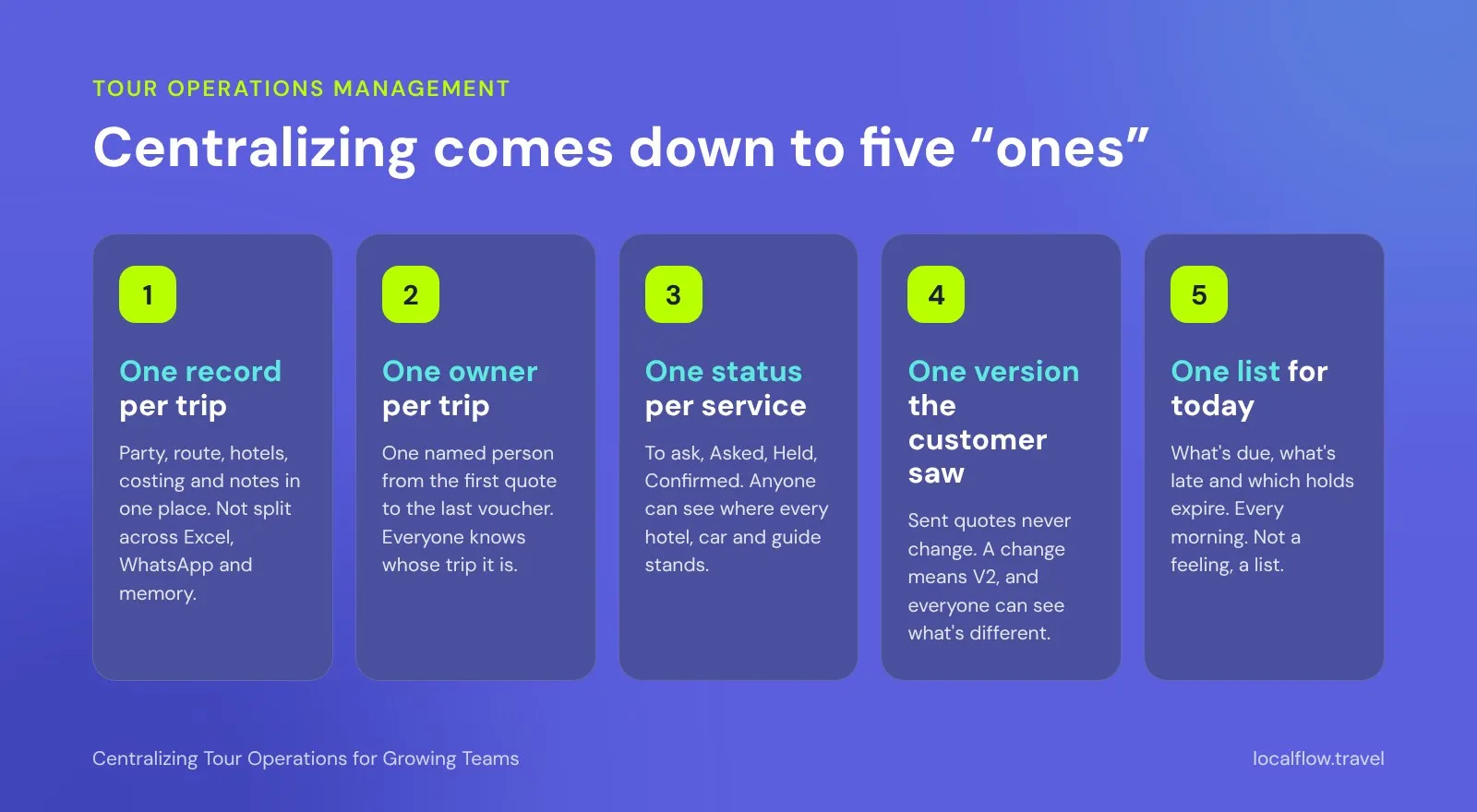
In practice, good tour operations management comes down to five “ones.”
One record per trip. Every detail of a trip sits in one place: the party, the route, the hotels, the costing, the notes. Not partly in Excel, partly in WhatsApp and partly in someone’s head.
One owner per trip. One named person is responsible for each trip from the first quote to the last voucher. Others can help, but everyone knows whose trip it is.
One status per service. Every hotel, vehicle, guide and ticket has a clear status. Have we asked? Is it held? Is it confirmed? Anyone on the team can see the answer without asking.
One version the customer saw. Once a quote goes out, it doesn’t change. If something changes, a new version goes out, and everyone can see what’s different between them.
One list of what needs doing today. Every morning, the team can see what’s due, what’s late and what’s about to expire. Not a feeling. A list.
Get these five right and the tool you use matters much less. Get them wrong and no tool will save you.
How to start centralizing this month (even in Excel)
You don’t need a new system to start. You can do all six of these with the tools you already have. Most teams can put them in place within a month.
- Name an owner for every active trip. Go through your live bookings this week and put one name against each. If a trip has no owner, it gets one today. New enquiries get an owner the moment they arrive.
- Agree on one set of statuses. Pick four or five words and use them for every service, every time. For example: To ask, Asked, Held, Confirmed, Declined. When a coordinator says “done,” nobody knows what that means. When they say “Held until Thursday,” everybody does.
- Write down every hold with its expiry. A hold agreed on the phone doesn’t exist until it’s written next to the trip, with the date and time it ends. Then check that list every morning.
- Number every quote you send. V1, V2, V3. Never edit a quote after it’s been sent. If the trip changes, send a new version and note what changed. This one habit prevents most invoice arguments.
- Move decisions out of WhatsApp. WhatsApp is fine for talking. It’s terrible for remembering. When a decision is made in a chat (an extra night, a room upgrade, a changed pickup time), copy it into the trip record the same day.
- Run a ten-minute morning check. Before the phones start, the team looks at three things together: holds expiring in the next 48 hours, services still not confirmed for trips arriving this week, and anything with no owner.
These habits feel slow for the first two weeks. After that, they save more time than they cost, and the 2am messages stop turning into 8am confusion.
When a spreadsheet stops being enough
A well-run spreadsheet can carry a small operation a long way. But it has limits, and growing teams hit them quickly.
A spreadsheet can’t warn you that a hold expires in two hours. It can’t stop someone editing a quote that has already gone to the customer. It can’t show a new coordinator the history of a trip they’ve just picked up. And when six people work in the same file, someone always ends up working in an old copy.
The usual sign is simple. You’re spending more time keeping the spreadsheet accurate than the spreadsheet saves you. That’s when it makes sense to look at tour operator software, and specifically software built for the way DMCs work: multi-day routes, hotel tariffs with seasons and child rules, drivers who need a room, and agents who change their minds.
General project management tools usually aren’t the answer. They understand tasks. They don’t understand that moving one night in Kandy changes the hotel, the kilometres, the driver’s allowance and the price per person. We’ll cover that in a later article.
How Localflow handles this
We built Localflow because we ran into every one of these problems ourselves. It’s DMC software designed around the five “ones” above.
A trip starts from the enquiry. Paste the agent’s email or WhatsApp message and Localflow reads the party, rooms and meal plan into a new trip. Repeat routes start from a “usual trip” instead of a blank page.

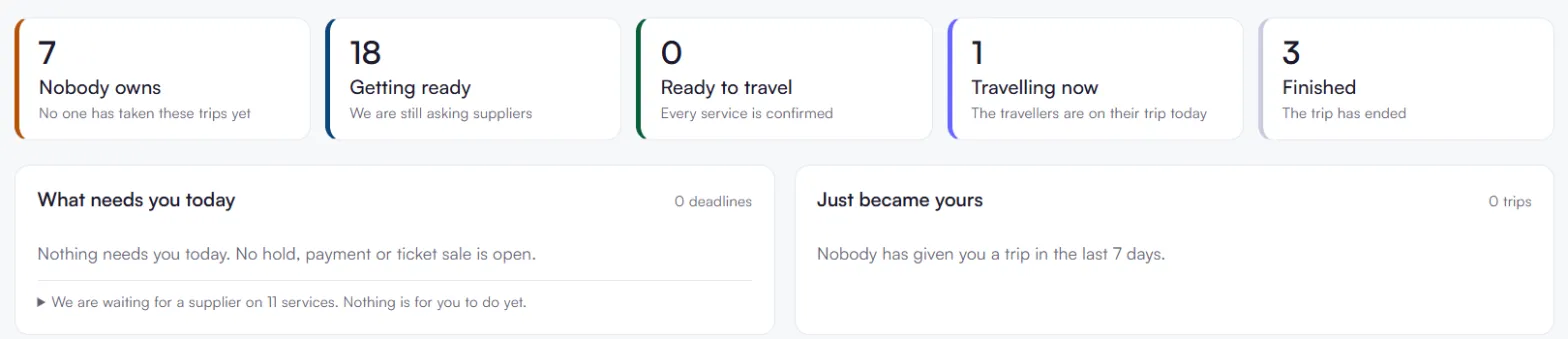
Every trip has an owner. The Operations home shows trips nobody owns yet, so nothing sits unclaimed.
Every service has a status. Hotels, vehicles, guides and tickets move through the same statuses: To ask, Asked, Held, Confirmed. Anyone on the team can see where each one stands.
Holds don’t expire quietly. Localflow warns the coordinator before a hold runs out. If it expires anyway, it goes to the team lead’s “Needs a lead” list.
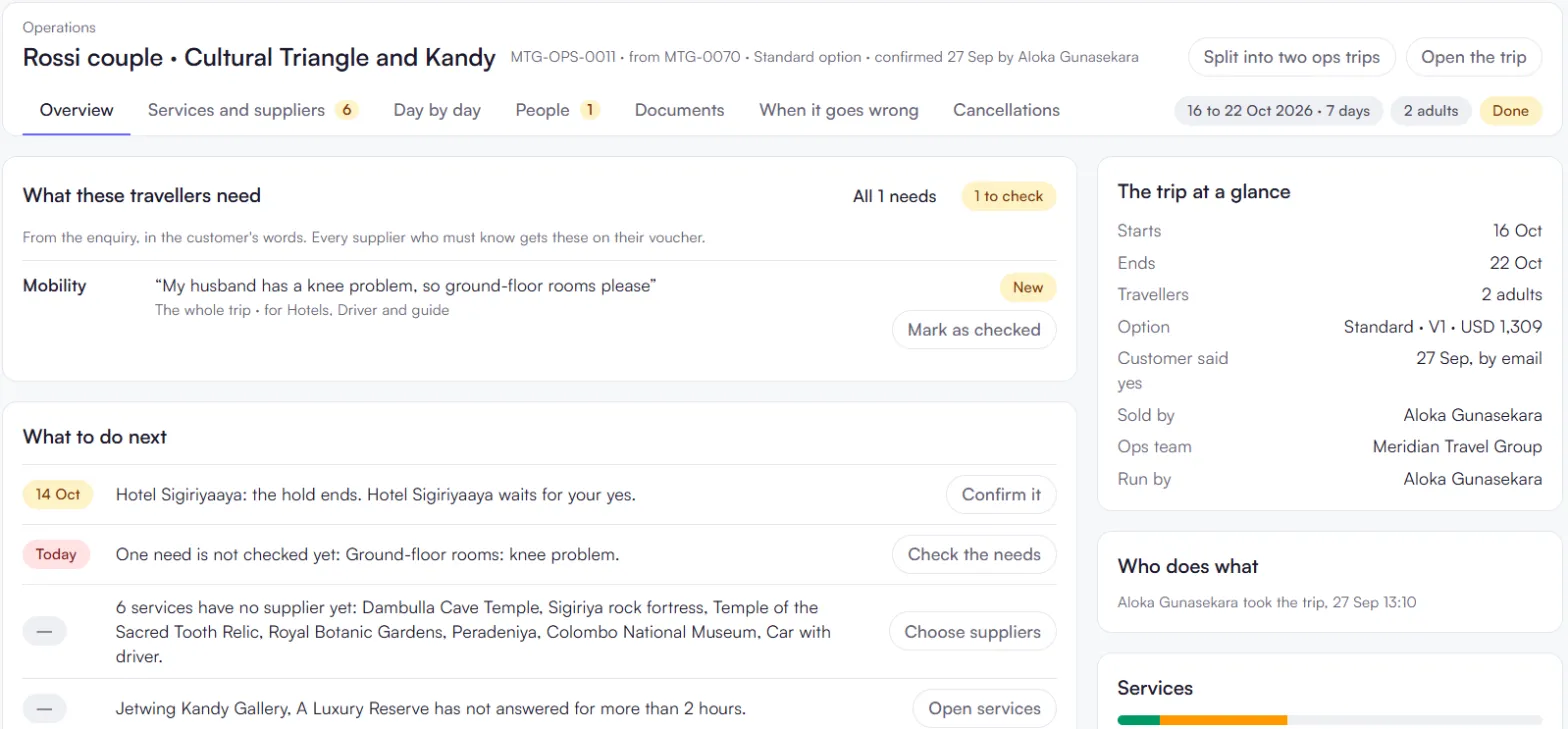
Sent quotes stay sent. Once a version is issued, it’s locked. A change means a new version, and the newest one shows what changed since the last.
One list for today. “What needs you today” shows each person what’s due. Items leave the list only when they’re done, not when someone dismisses them.
Asking a supplier takes one click. Choose email, WhatsApp or a call, and the message is ready: the services, the number of travellers and your reference. Localflow records that you asked, so every request is tracked and nothing gets forgotten.
Growth didn’t break your operation
Your team got bigger because your business is working. Agents trust you. Guests come back. That’s the hard part, and you’ve already done it.
What stopped working is the place the information lives. A WhatsApp group can hold a conversation. It can’t hold an operation of eight people and forty live trips.
Start with the six habits above this month. If you outgrow the spreadsheet along the way, Localflow is built for exactly that point.
Start free. No credit card. Cancel if it doesn’t change how you work. Start your free trial
Growth didn’t break your operation. The group chat did.
Frequently asked questions
What is tour operations management?
Tour operations management is everything that happens between a customer saying yes and the trip ending. That means booking hotels, vehicles and guides, tracking holds and confirmations, issuing vouchers, handling changes and paying suppliers. For a DMC, it’s the part of the business that decides whether a trip runs smoothly.
When should a tour operator move off spreadsheets?
Usually when more than four or five people work on trips at the same time, or when you’re running more than 20 or 30 live trips. The clearest sign is that keeping the spreadsheet accurate takes longer than the time it saves.
What is DMC software?
DMC software is a system built for destination management companies. It handles multi-day routes, hotel tariffs, transport costing, supplier confirmations and vouchers in one place. General booking or task tools usually can’t handle routes and tariffs the way a DMC needs.
Can a small tour operator centralize without new software?
Yes. Name an owner for every trip, agree on one set of statuses, write down every hold with its expiry, number every quote version and run a short morning check. Software makes these habits easier at scale, but the habits come first.